India fines Google $113 million, orders to permit third-party payments in Play Store
Techcrunch
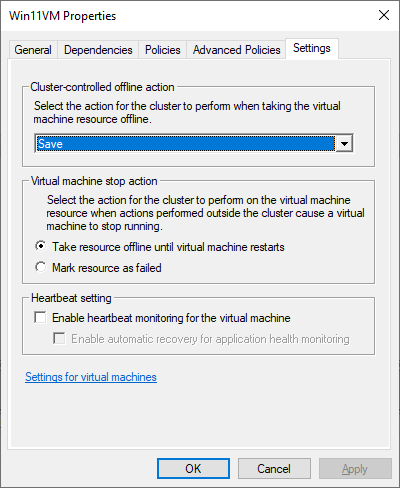
I started to run muwire in one of my VMs. Every time i logged in to the VM by RDP is was restarted. I looked at the logs. It only said the the VM had failed. The same thing happened to my web server VM. When i started up vs code, chrome and smartgit the VM restarted. First i thought it was something wrong with Hyper-V. It was better on a faster cluster node. After searching a long time with Google i found an answer. Turned out it is not a bug. It is a feature. If “Enable heartbeat monitoring” is checked then Hyper-V will restart a VM if it stops responding. It restarts it to get it working again. There is something with muwrire that hangs VMs for a long time. In the pic heartbeat monitoring is turned off. VM will never be restarted because they are too slow.

I wanted to use Linux containers. I read about Docker and Podman. I believed that Podman was better. I few days ago i discovered lxd. It is more like virtual machines. I like that. Lxd have a cluster function. All nodes remember the settings. I can add network interfaces and volumes after the container is created. It does not loose state.
Took me many hours to get Wireguard working in a Windows server 2022 VM. After many hours i understood that large UDP packets disappeared when they should go from the guest to the host. UDP packets over 1000 bytes just disappeared. First i set MTU to 1000 in the Windows guest. That made the network work. When i switch the virtual network adapter to e1000e instead of virt-io the UDP packets stopped disappearing.
You can see the network connections names with
netsh int ipv4 show sub
You can change the MTU in windows with
netsh int ipv4 set sub <Connection name> mtu=<size> store=persistent
example
netsh int ipv4 set sub "Wi-Fi 2" mtu=1492 store=persistent
I tried to use 6rd to get IPv6 at home
It worked. I found a script that uses ip2route set up a 6rd tunnel on Linux. If you look at the script you see that the IPv6 address is calculated from the IPv4 address. That is bad. That means if your IPv4 address changes your IPv6 addresses will also change. I will continue to use a Hurricane electric tunnel. Then the IPv6 addresses will always be the same.
#!/bin/sh
## You must have a real routable IPv4 address for IPv6 rapid deployment (6rd)
## tunnels.
## Also make sure you have at least linux kernel 2.6.33 and you have enabled 6rd
## CONFIG_IPV6_SIT_6RD=y
PREFIX="2a02:2b64" # 6rd ipv6 prefix
GATEWAY=`dig +short 6rd.on.net.mk` # 6rd gateway host
modprobe sit
## Try to autodetect the local ipv4 address
MYIPV4=`ip -o route get 8.8.8.8 | sed 's/.* src \([0-9.]*\) .*/\1/'`
## Generate an IPv6-RD address
MYIPV4_nodots=`echo ${MYIPV4} | tr . ' '`
IPV6=`printf "${PREFIX}:%02x%02x:%02x%02x::1" ${MYIPV4_nodots}`
## Setup the tunnel
ip tunnel add 6rd mode sit local ${MYIPV4} ttl 64
ip tunnel 6rd dev 6rd 6rd-prefix ${PREFIX}::/32
ip addr add ${IPV6}/32 dev 6rd
ip link set 6rd up
ip route add ::/0 via ::${GATEWAY} dev 6rd
## IPv6-rd allows you to have IPv6 network in your LAN too. Uncomment the
## following 3 lines on your Linux router and set the correct LAN interface.
## You might also want to run the 'radvd' sevice to enable IPv6 auto-configuration
## on the LAN.
# sysctl -w net.ipv6.conf.all.forwarding=1
# LANIF=eth0
# ip addr add ${IPV6}/64 dev ${LANIF}
iif eth0 tcp dport { smtp, 587 } ct state new counter meter smtp-meter { ip saddr limit rate over 6/hour burst 3 packets } nftrace set 0 counter drop
This rule was working for a long time. One month ago it stopped working. Now it never drops any packets.
Bacula, Urbackup and Proxmox backup server dont do bare metal recovery backups for Linux. Veeam can do it, but the kernel developers break the Veeam kernel module for every new version of the kernel. I now have trouble to make fedora stay on 5.16 kernel it always wants remove that version and replace it with 5.17. 5.16 is the last version that Veeam linux agent works with. Nakivo copied the entire disk when doing backup. I was only using 30GB but it always copied 600GB. Some idiots suggest you use dd. Then i would have to make a 600GB file for every backup. And the backup would not be consistent.
This is much better than the Samsung 980 NVME SSD. The settings i used.
fio --filename=/dev/nvme0n1 --direct=1 --rw=write --bs=4k --ioengine=libaio --iodepth=1 --runtime=10 --numjobs=1 --time_based --group_reporting --name=iops-test-job --sync=1
I used Ceph blockdb and wal cache before. It did not do any read caching. Lvm caching is smarter. It caches the most used blocks. When i start up something it can be slow at first, but after a while the read and write speeds go up. I set caching mode to writeback. I used cachepool and not cachevol.
- Create a PV of the SSD
- Add PV to same VG as the slow HDD
- Create a large cache LV on the SSD
- Create a smaller metadata cache LV on the SSD
- Create cache LV from data and metadata LV
- Add cache LV to the HDD LV
Everything can be done while the HDD LV is online.
I tested a new one i bought a few days ago. I tested with fio. I set sync=1, direct=1, blocksize=4k, iodepth=1 and numjobs=1