Categories
Ceph

I gave up on RAID for high availability

I now use Ceph instead. When i needed to restart the server with a RAID volume i had to stop all VMs using it. With Ceph i can restart a node without stopping anything. Ceph is an excellent choice for high availability (HA) due to its design and architecture.

Why Ceph Excels at Availability

Here are some key reasons why Ceph is well-suited for HA:

  1. Distributed Architecture: Ceph’s distributed architecture ensures that data is striped across multiple nodes, making it more resilient to failures. If one node fails, the remaining nodes can continue to operate and provide access to data.
  2. Self-healing: Ceph’s self-healing capabilities allow it to detect and automatically recover from node failures. This ensures that your storage system remains available even when individual components fail.
  3. No Single Point of Failure (SPOF): Ceph’s design eliminates SPOFs by distributing data across multiple nodes. If one node fails, the other nodes can take over without impacting availability.
  4. Scalability: Ceph scales horizontally to meet increasing storage demands, ensuring that your HA setup remains performant and efficient even as your data grows.
  5. Multi-site Replication: Ceph supports multi-site replication, which enables you to maintain a copy of your data at a secondary site for disaster recovery or load balancing purposes.
  6. High-performance replication: Ceph’s high-performance replication capabilities ensure that replicated data is kept up-to-date in real-time, minimizing the risk of data inconsistency.

How Ceph Achieves High Availability

Ceph achieves HA through several mechanisms:

  1. OSD (Object Storage Daemon) failures: If an OSD fails, other OSDs can take over its role and continue to provide access to data.
  2. PG (Placement Group) rebalancing: When a node fails, Ceph rebalances PGs across remaining nodes to ensure continued availability.
  3. Monitors: Ceph’s monitors monitor the health of OSDs and automatically detect failures, triggering self-healing mechanisms.

Benefits of Using Ceph for HA

By using Ceph for your storage needs, you can enjoy:

  1. High uptime: Ceph’s design ensures that data remains accessible even in the event of node failures.
  2. Scalability: Ceph scales horizontally to meet increasing storage demands without impacting performance.
  3. Reduced maintenance: With Ceph, you can focus on running your applications rather than worrying about storage maintenance and upgrades.

In Conclusion

Ceph’s distributed architecture, self-healing capabilities, and multi-site replication make it an ideal choice for high availability. By leveraging Ceph for your storage needs, you can ensure that data remains accessible even in the face of hardware failures or outages.
Categories
Ceph

A Kingston DC1000B 480GB NVME SSD can do 11400 write IOPS

This is much better than the Samsung 980 NVME SSD. The settings i used.

fio --filename=/dev/nvme0n1 --direct=1 --rw=write --bs=4k --ioengine=libaio --iodepth=1 --runtime=10 --numjobs=1 --time_based --group_reporting --name=iops-test-job --sync=1

Categories
Ceph

My Ceph cluster is faster now that i use lvmcache

I used Ceph blockdb and wal cache before. It did not do any read caching. Lvm caching is smarter. It caches the most used blocks. When i start up something it can be slow at first, but after a while the read and write speeds go up. I set caching mode to writeback. I used cachepool and not cachevol.

  • Create a PV of the SSD
  • Add PV to same VG as the slow HDD
  • Create a large cache LV on the SSD
  • Create a smaller metadata cache LV on the SSD
  • Create cache LV from data and metadata LV
  • Add cache LV to the HDD LV

Everything can be done while the HDD LV is online.

Categories
Ceph

A Samsung 980 NVME SSD can do 1600 write IOPS under worst conditions

I tested a new one i bought a few days ago. I tested with fio. I set sync=1, direct=1, blocksize=4k, iodepth=1 and numjobs=1

Categories
Ceph

Write speed is slow on my Ceph storage cluster

Today i decided to find out why the write speed is slow on my Ceph cluster. Read speed is good. I noticed that i have high utilization even on slow write speeds. I cant get higher write speeds than 30MB/s. Then the disk utilization is close to 100%. I have put block db and write ahead log on SSDs. I expected that to make the write speeds much better. I see now that the SSDs are little used. Most writes go straight to the HDD. The HDDs can write 200MB/s and i have 10gbps network between the nodes. The problem is that Ceph always do synchronous writes. That means the write call must not return before the data is written to stable storage. That makes both HDDs and SSDs much slower. To get faster writes i need SSDs with power loss protection. SSDs with PLP can say that data is written to storage as soon as the data is in the SSDs cache, because the SSD knows it have enough power to write the data to storage even if there is a power loss.

The write speed is much better on my Windows cluster. Storage spaces direct writes data first to the cache SSD and says that data is written to stable storage. I have SSDs with PLP on two nodes. On one node the SSD dont have PLP so i turn on write cache in device manager every time i restart the node. Storage spaces direct turns it off every restart.

Categories
Ceph

It is not enough to run dnf update to update a Ceph cluster

When i ran dnf update on my Fedora Ceph nodes a week ago i noticed that there was a new version of Ceph. Previously i had 16.2.6 but now i got 16.2.7. When i looked at the host list today all nodes where still 16.2.6. After searching for a while i found an upgrade command. After starting an upgrade Ceph pulled new images for the Podman services.

Ceph orch upgrade start
Categories
Ceph Storage spaces direct

I thought i had found something great for my external harddisks

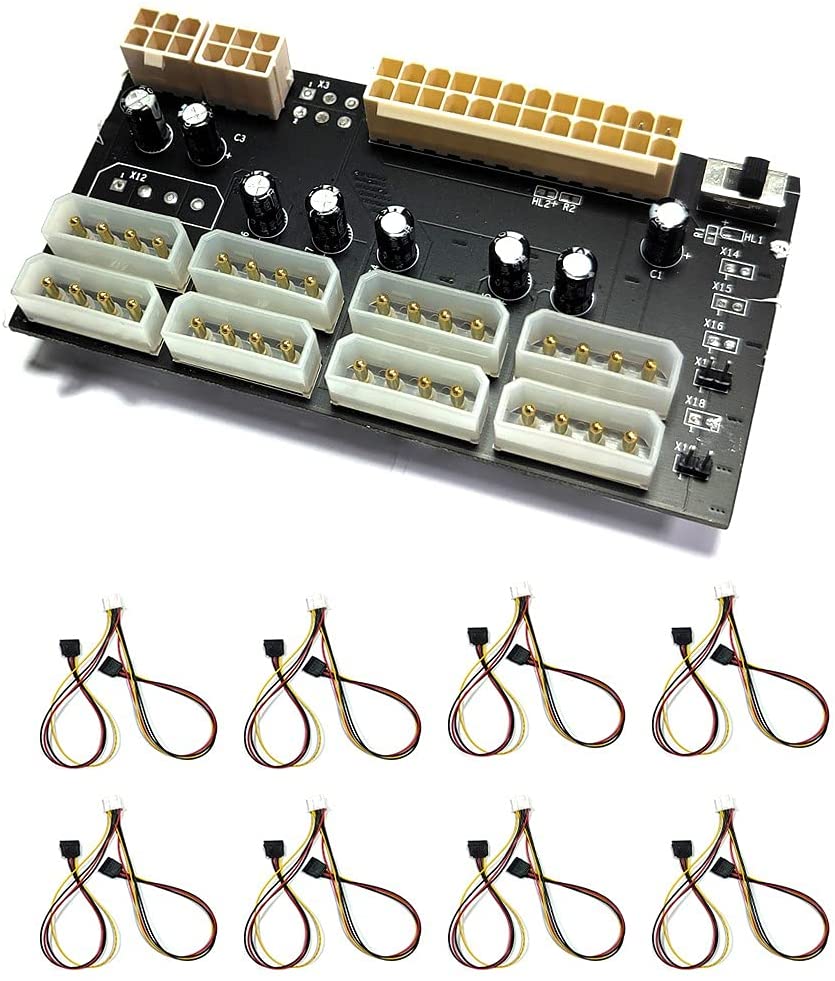
I thought it would be easy to power 12 harddisks from an ATX power supply. I dont know why i need 2 power supplies. When i saw this ATX power breakout board i thought it would be easier to get all power out of the supplies. It looked very easy. Connect the 24 pin motherboard and the two PCIe 6 pin connectors to the board and then i would get lots of current from the Molex connectors. I started with one PCIe connector. Two seconds after i had connected it 4 capacitors exploded. It was only 12V. I cant find any instructions how to use this board. The one i got does not look exactly like the one on Amazon pictures. It is written “www.daniaoge.com” on the board i have.

Categories
Ceph

How to use a SSD as a cache for HDD on Ceph

ceph-volume lvm prepare --data /dev/sdb --block.db /dev/sda1 --block.wal /dev/sda2

sdb is a harddisk. sda1 and sda2 are partitions on a SSD. You dont have to make any filesystems on the drives. I used fdisk to split the SSD in two parts. If prepare succeeds you can use

ceph-volume lvm activate --all

to start up the OSD. One difficult part is the keyring for ceph-volume. ceph-volume is not using the id client.admin. Do this if ceph-volume cant login.

ceph auth get client.bootstrap-osd >/var/lib/ceph/bootstrap-osd/ceph.keyring
Categories
Ceph

If you have stray OSD daemons on Ceph

On the command line on the machine with a stray OSD daemon use the command “cephadm adopt –name osd.3 –style legacy”. Replace 3 with the number for the OSD you want cephadm to adopt. You find messages like this in the log in the web interface “stray daemon osd.3 on host t320.myaddomain.org not managed by cephadm”. That means you have to be on the command line on computer t320.

Categories
Ceph

A working example of a Ceph RBD pool for VMM

<pool type="rbd">
  <name>RBD</name>
  <source>
    <host name="192.168.7.23" port="6789"/>
    <host name="192.168.7.31" port="6789"/>
    <name>rbd</name>
    <auth type="ceph" username="libvirt">
      <secret uuid="ce81a9d5-e184-43f5-9025-9a062d595fcb"/>
    </auth>
  </source>
</pool>

Host elements are addresses to mons. Auth element is a pointer to a registered key. On this webpage you can find information about how to register a Ceph key. https://docs.ceph.com/en/latest/rbd/libvirt/ The first name element is the name for the libvirt pool. The second name is the name of the Ceph RBD pool. In Connection manager in Virtual Machine Manager you have to create a pool and paste the XML into the textbox on the XML tab.